Deburring parts with complex geometries, such as wheel rims, is often a time‑intensive challenge for manufacturers seeking to automate the process. While it’s straightforward to program simple trajectories like straight lines or circles, non‑uniform curves and irregular shapes typically require extensive manual programming and tuning, which consumes valuable production time.
In this post, we’ll walk you through the step‑by‑step process of setting up multiple robotic deburring paths in Augmentus Robotics’ AutoPath™ software as seen in our demonstration—with no collisions, no joint singularities, and minimal trial‑and‑error.
Step 1: Setting Up Your Offline Robot Simulation Environment
AutoPath™ provides a comprehensive offline simulation environment that supports multiple robots, diverse end‑effectors, and external axes such as turntables, linear rails, and conveyors. This lets you construct a digital twin of your physical workstation before commissioning.
With correct calibration between robot, vision system, and external axes, AutoPath™ enables highly accurate motion planning and cycle‑time estimation, helping reduce the downtime typically associated with on‑line reprogramming and iterative testing.
AutoPath™ accepts CAD models, mesh inputs, and scan data from a variety of sources, enabling manufacturers to begin programming regardless of how their part data was captured.
Step 2: Identifying Work Surfaces/Edges
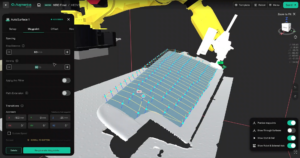
Selecting surfaces in AutoPath™ is intuitive. You can auto‑select regions or use selection tools like the Brush to mark specific surfaces or edges. Depending on whether the selection corresponds to a surface or an edge, AutoPath generates the appropriate toolpaths optimized for that process.
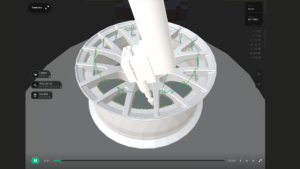
For example, selecting the interior bezel of a wheel rim hole and defining start/end points will automatically generate waypoints that follow the perimeter of that feature.
Step 3: Process Parameters
AutoPath™ bridges the gap between process expertise and robot programming. Operators can input key process parameters—such as standoff distance, angle of attack, step distance, and approach/exit behaviors—that govern how the tool interacts with the surface.
These parameters can be applied consistently across an entire path, ensuring uniform material removal without the need to manually adjust individual waypoints, unless fine‑tuning is required.
Step 4: Trajectory Optimization
The Path Optimizer feature examines the full robot and external axis configuration to generate motion plans that avoid kinematic singularities and collisions across the robot workspace.
Instead of manually adjusting robot poses to try and prevent faults, Path Optimizer evaluates the kinematics of all axes and recomputes safe, smooth trajectories in minutes—supporting multiple passes and complex motion sequences efficiently. The feature also works when tool angles are constrained, allowing operators to program error-free movement while adhering to strict process requirements.
Step 5: Simulating Robot Motion
Validating robot movement on the physical line traditionally interrupts production and necessitates careful supervision. Testing motion online often results in:
- Unplanned downtime of production assets
- Parts scrap due to motion errors
- Intensive manual debugging
With AutoPath™, validated motion plans and external axis coordination can be simulated offline. This boosts confidence in robot behavior, reflects realistic cycle time expectations, and helps integrate robot activities into production planning with minimal disruption.
Step 6: Vision-Guided Adaptive Motion

Vision systems have a wide range of applications within manufacturing, such as picking, sorting, and inspection. However, the “eyes” of the robot have the potential to do much more—with Augmentus Vision, we’re using it to make automation more effective in real-world environments that aren’t as perfect and controlled as the lab.
In some operations like Maintenance, Repair & Overhaul (MRO), dimensional variability isn’t something that can be controlled—it’s just part of the job. And when it comes to positional variability, controlling it with expensive jigs and fixtures is only effective in low-mix environments.
That’s where Augmentus Vision comes in. By detecting changes in part position and surface geometry (dimensions), AutoPath™ is now able to handle the positional and dimensional variability that comes with real-world manufacturing environments, allowing the robot to adapt and align to variation without the need for constant human input.
Conclusion
As a capable offline robot programming solution, AutoPath™ lets operators simulate and optimize robot motion with controlled process parameters, collision‑free trajectories, and reliable motion planning. This leads to reduced programming downtime, fewer production interruptions, and smoother deployment of deburring operations on complex parts like wheel rims.
Contact our sales engineers to assess AutoPath™’s fit for your production line, or visit our YouTube channel to see how our vision‑integrated workflows support adaptive automation in high‑mix environments.