Can Augmentus handle reflective or dark surfaces for 3D scanning?
Yes, Augmentus can accommodate reflective or dark surfaces in 3D scanning, though these surfaces can present unique challenges due to light absorption or reflection. Augmentus offers techniques and adjustments to enhance scan accuracy on these surfaces. For applications requiring high precision, we may recommend compatible scanners specifically designed to handle reflective or low-light surfaces, ensuring reliable and detailed scans.
Is it possible to integrate Augmentus with tools that use custom scripts?
Yes, Augmentus can be integrated with tools that use custom scripts. For custom script integration, users can leverage the solution’s customizable API settings to define unique actions, manage custom I/O configurations, and incorporate additional commands, ensuring that Augmentus fits smoothly into various operational setups.
How long does the typical setup and calibration process take with Augmentus?
Thanks to pre-configured settings and automated calibration, the full setup process to retrofit Augmentus into your existing system can be completed in just 2 days, allowing for rapid deployment, even for high-mix production environments.
Can Augmentus adjust for slight positional shifts in the workpiece after setup? My current process involves manually placing the workpiece in the cell.
Yes, Augmentus can compensate for slight positional shifts in the workpiece after setup. Using in-situ correction and 3D scanning capabilities, Augmentus detects deviations in the workpiece’s position and adjusts the robot’s path accordingly. This feature is especially beneficial in setups where workpieces are manually placed, as it minimizes the need for precise placement and reduces manual adjustments, ensuring accurate and consistent processing.
Can Augmentus support automated localized treatment?
Yes, Augmentus offers a closed-loop surface finishing and treatment automation module capable of localized treatment on specific areas of interest, such as rust, coatings, and defects. The closed-loop system inspects the workpiece to identify these areas, then generates targeted robotic motion to perform localized processing precisely where needed. For more details on this offering, please contact our sales team.
Frequently Asked Questions
Can’t find an answer? Get in touch with us.
Trial Scope
What capabilities are included in the trial?
The trial is a free 14-day evaluation you download and run on your own Windows PC, with no on-site setup. Use the sample workstations or import your own CAD files.
What you can do:
Import CAD files (.step, .obj, .stl), including your real production parts
Generate toolpaths automatically for complex surfaces and edge profiles
Visualise toolpaths
Run full offline robot simulation with cycle-time calculation
Optimise paths for reachability, singularity avoidance and collision avoidance
What is not included (the trial is for evaluation, not production):
No robot script generation
No file transfer or deployment to a physical robot
No 3D scanning or vision-guided correction
Access: trial licences are issued per company with a set number of named users, and can be shared within your approved team.
What systems or hardware does the trial support?
The trial is software-only, so you do not need a scanner or robot connection.
Recommended Settings
OS: Windows 11 (64-bit)
CPU: Intel Core i7 (13th Gen or newer)
RAM: 16 GB (32 GB or more for large, high-resolution meshes)
Storage: 512 GB
Performance requirements scale with part complexity. If you are unsure whether your current hardware is suitable, our team is able to advise based on the part or process in question.
Is technical support available during the trial?
Yes. Tutorials and onboarding guidance are included to help you get started, and you can request dedicated engineering support.
How do I continue using the software after the trial?
To move to a paid plan:
Contact the Augmentus team
Choose the tier that fits (Standard or Pro)
Complete commercial onboarding and activation
We can also arrange a technical discussion to assess production-deployment readiness.
Set Up and Integration
Can Augmentus be integrated with my current hardware like robots and positioners?
Yes. Augmentus is brand-agnostic.
Augmentus supports a broad range of robot brands and controllers, including ABB, FANUC, KUKA and Universal Robots
It integrates external axes such as positioners, turntables and linear rails, and synchronises them in the motion
Augmentus works with industrial sensors and 3D scanners*
*For the Pro package, your scanner needs to meet certain specs. If it does not, we will recommend a compatible option and advise on integration.
Is it possible to integrate Augmentus with tools that use custom scripts?
Yes. Augmentus’ functionality includes:
Customisable API settings to define your own actions
Custom I/O configuration and additional commands
The ability to upload and run your own custom scripts
Does Augmentus require CAD files for initial setup, or can it work entirely from 3D scans?
CAD is not required. What you need depends on the package.
Standard (software only, no scanning hardware): generates toolpaths from CAD models, or from imported 3D-scan meshes (.step, .obj, .stl) created by a third-party scanner.
Pro (adds Augmentus Vision hardware): high-accuracy in-house 3D scanning (structured-light and laser-profile), 3D reconstruction, and vision-guided part correction.
In short: if you already have CAD or scan data, Standard can program from it. If you need to capture the geometry yourself or work on parts without reliable CAD, Pro gives you built-in scanning.
Can Augmentus advise on the best process parameters for my specific application, like spray coating thickness or welding speed?
Augmentus provides programming and toolpath generation capabilities. The best process parameters come from deep process expertise, so:
We work with domain-expert solution partners and process specialists who understand your specific process
Together they help define and qualify the right parameters for your application (coating thickness, spray standoff, welding speed, blasting intensity, force control, and so on)
The software then lets you set, save (via recipe tables and templates) and repeat those parameters precisely, every run.
How long does the typical setup and calibration process take?
For a typical install, it can be as short as 2 to 3 working days.
However, the exact timeline depends on the complexity and scope of the project.
How does Augmentus handle environmental factors like dust or high heat on the shop floor?
Augmentus uses industrial-grade 3D scanners with sealed, IP67-rated casings that are dust-tight and resistant to water spray. The scanner is also housed in an air-tight protective enclosure, built to withstand high-heat environments.
Features
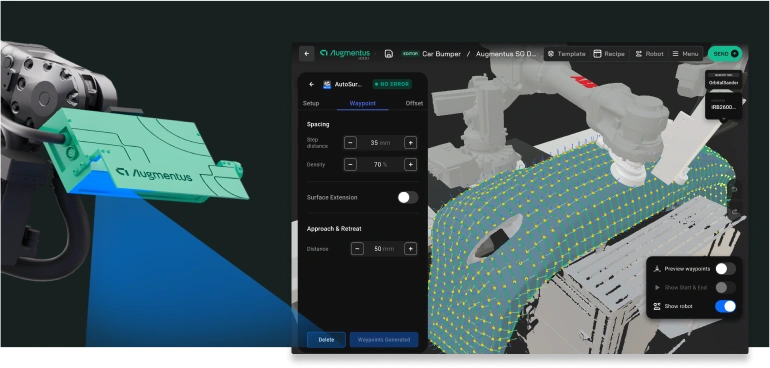
Can Augmentus handle reflective or dark surfaces for 3D scanning?
Yes, with the right scanner. We offer different vision hardware* for different needs:
Blue-laser and blue-LED scanners: higher resolution, better on dark, reflective or transparent surfaces
Red-laser scanners: wider coverage, suited to large parts
Structured-light scanners: fast capture of large or complex surfaces
We match the scanner to your part’s size, accuracy and surface finish. For very shiny surfaces, exposure tuning or a temporary anti-reflective coating may be recommended.
*Augmentus scanners are only available with the Pro package
Can Augmentus adjust for slight positional shifts in the workpiece after setup? My current process involves manually placing the workpiece in the cell.
Yes. This is what AutoAlign* does:
Scans the workpiece and compares it to the reference model
Calculates the positional and rotational deviation
Automatically corrects the robot path within the limits you set
Removes the need for precise fixturing or exact manual placement every time
*AutoAlign uses Augmentus Vision and is part of the Pro package.
Can Augmentus manage multi-axis movements required for complex part geometries?
Yes. Augmentus generates and simulates the coordinated multi-axis motion required to reach complex geometries and orientations, while maintaining tool orientation across intricate surfaces and edges.
Additionally, it includes a trajectory optimization module that keeps paths feasible, solving for reachability and avoiding singularities.
Does Augmentus support automatic collision detection and avoidance during path generation?
Yes, Augmentus supports both collision detection and avoidance, which is especially useful in dense or multi-robot cells.
Collision detection: offline simulation flags collisions before you run
Collision avoidance: Path Optimizer adjusts the generated path to avoid the part, tooling, fixtures and surroundings
Where is my Augmentus project information stored?
Your Augmentus project information is stored locally. An internet connection is not required to run Augmentus software.
Need Expert Guidance Before Choosing?
Need Expert Guidance Before Choosing?
Discuss your requirements with our automation experts to find the perfect fit.
Discuss your requirements with our automation experts to find the perfect fit.
Scroll to Top
Schedule a Demo
Our demo call is designed to understand your unique goals and challenges.
We'll showcase real-world examples of how Augmentus has been successfully deployed in similar applications, providing insights into its transformative potential.
By the end, you'll gain clarity on how our solution can address your needs effectively and drive impactful results.